
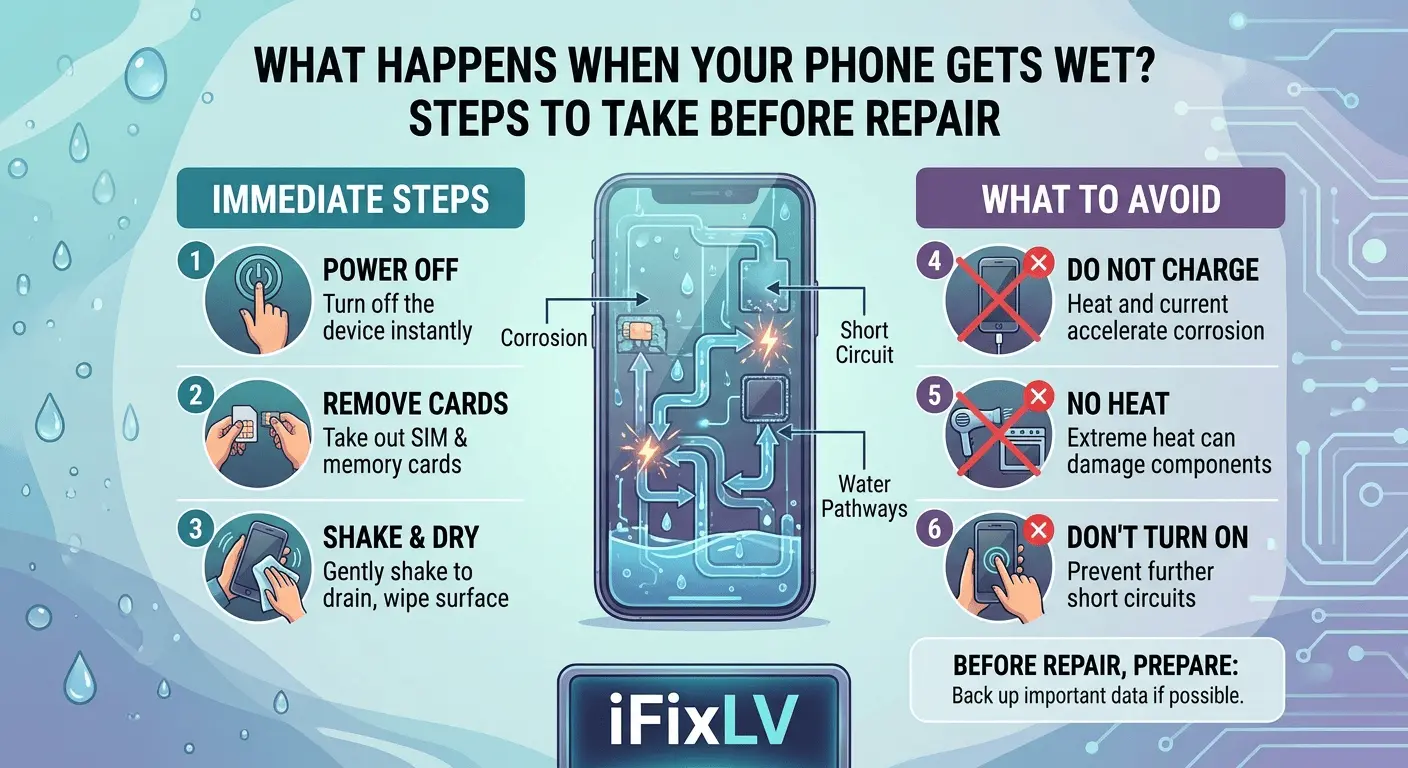
What Happens When Your Phone Gets Wet? Steps to Take Before Repair
Accidentally dropping a smartphone into water can be stressful, particularly when it contains important photographs, contacts, messages and personal information. Even a brief exposure to liquid can affect the way a device works. You might notice that the screen starts flickering, the speakers sound different or the phone stops responding altogether.
Modern smartphones may offer some level of water resistance, but this does not mean they are completely waterproof. Water resistance can also change as a device ages or suffers physical damage.
Knowing what to do immediately after liquid exposure can help reduce further damage and improve the chances of a successful repair.
1. Remove Your Phone from the Water Immediately
The first thing to do is remove the phone from the liquid as quickly as possible. The longer a device remains submerged, the greater the opportunity for moisture to reach sensitive internal components.
Take it out carefully and avoid pressing unnecessary buttons. If the phone is still switched on, do not continue using applications to check whether everything works.
If the device is connected to a charger, disconnect the power source safely before handling the phone.
2. Switch Off the Device
If your phone is still working after getting wet, switch it off as soon as possible. Keeping an electronic device powered on while moisture is present inside can increase the risk of electrical damage.
Do not repeatedly restart it to check whether it has recovered. A phone that appears normal immediately after an accident may develop problems later as moisture affects internal connections.
If the device has already switched off, leave it off until it has been professionally assessed or confirmed to be safe.
3. Remove the Case and External Accessories
Phone cases can trap moisture around the edges, buttons and charging area. Remove the case and any detachable accessories so that the outside of the device can be dried more easily.
If your model has a removable SIM tray, follow the manufacturer’s guidance before removing it. Do not force any components out of the device.
Use a clean, soft, lint-free cloth to gently wipe visible moisture from the exterior. Pay attention to the screen, frame and back of the phone.
Avoid shaking the phone aggressively, as this may move liquid further inside.
4. Avoid Common Drying Methods That Can Cause Damage
Many people try household tricks when their phone gets wet. Unfortunately, some of these methods can create additional problems.
Do not put your phone in rice. Rice does not reliably remove moisture from internal components. Small particles can also enter the charging port and other openings.
Do not use a hairdryer. Direct heat can damage the screen, battery, seals and internal components.
Avoid placing the device in direct sunlight. Excessive heat may create further problems.
Do not use compressed air. Strong airflow can push moisture deeper into the device.
The safest approach is to keep the phone switched off, avoid charging it and seek professional advice.
5. Understand Why Water Damage Can Affect Different Components
Liquid exposure does not always produce the same symptoms. The location of the moisture and the length of exposure can influence which components are affected.
Display Problems
Moisture may affect the display assembly, causing flickering, unusual lines, dark areas or touch response problems.
Charging Problems
Liquid inside the charging port can interfere with the connection between the cable and the device. Some phones may display a moisture warning and temporarily prevent charging.
Speaker and Microphone Problems
Water around speaker openings or microphone components may result in muffled sound, reduced volume or poor call quality.
Battery and Internal Circuit Damage
In more serious cases, moisture can affect internal connectors, the battery or the logic board. Corrosion may develop over time and lead to problems even after the phone’s exterior looks dry.
6. Water Resistance Does Not Guarantee Complete Protection
Some smartphones have an IP rating that indicates their level of protection against dust and water under specific testing conditions.
However, water resistance is not permanent. It can weaken because of everyday wear, accidental drops, previous repairs and damage to seals.
It is also important to understand that resistance ratings are based on controlled laboratory conditions. Exposure to swimming pools, salt water, soap, drinks and other liquids can present different risks.
Never assume that a water-resistant phone can safely be used underwater.
7. When Should You Take Your Phone for Professional Repair?
You should consider professional inspection if your phone has been exposed to liquid, particularly if it shows unusual behaviour.
Look out for signs such as:
- The phone will not switch on.
- The display flickers or becomes unresponsive.
- The charging system stops working.
- The speakers produce distorted sound.
- The camera lens appears foggy.
- The device becomes unusually hot.
- Battery performance changes suddenly.
Even if the phone appears to work normally, an internal inspection may be useful because corrosion is not always visible from the outside.
At IFix LV, customers can explore professional repair options for water-damaged smartphones. The team provides repair services for iPhones, Samsung devices and Google Pixel phones.
For further information, visit the iPhone repair page, Samsung repair page or Google Pixel repair page.
8. Protect Your Phone from Future Liquid Damage
Preventing liquid exposure is easier than dealing with the consequences afterwards.
Consider using a suitable protective case and keeping your smartphone away from sinks, swimming pools and wet surfaces. Be particularly careful when using your device near drinks or during outdoor activities.
If you spend time around water, a properly rated waterproof pouch can provide an additional layer of protection. However, check the product’s suitability and condition before relying on it.
Also, avoid placing your phone in damp pockets or bags where moisture can collect.
Get Your Water-Damaged Phone Checked
Water damage should never be ignored, even when the device appears to be working normally. Continuing to use or charge a wet phone can increase the risk of further damage.
Switch it off, keep it away from heat and avoid household drying tricks. If you notice any unusual behaviour, arrange a professional assessment.
IFix LV provides smartphone repair services in Las Vegas and can help assess different device problems. Getting the phone checked early can help you understand the available repair options and protect your important data.